External Interface
Inputs and Outputs
The Senquip QUAD-C2 has 5 multifunction Input/Outputs that can be individually configured.
Pin |
Channel |
|---|---|
3 |
IO 1 |
4 |
IO 2 |
5 |
IO 3 |
6 |
IO 4 |
7 |
IO 5 |
Each of the 5 IO can measure:
analog voltages,
currents into and out of the terminals,
frequencies,
pulses,
duty cycle,
digital ON or OFF state.
Each measurement can be calibrated and alerts of type info, alert, warning, and alarm can be set.
The IO can also be used as outputs and can be switched to:
OFF - high impedance,
VIN - connected via a switch to Vin,
GND - connected via a switch to GND,
VSET - connected to an internal configurable voltage source,
PULLUP - an internal pullup resistor is enabled.
Vset is an internal voltage source that can be set between 5 V and 25 V with VSET Voltage in the General IO settings. Vset is typically used to power external sensors. Vset is backed up by the internal LiPo battery and so will continue to operate if power to the device is intermittent, for instance if powered by solar. The setting for Vset voltage is used to control the feedback loop of a boost converter acording to a set of characterisation data. The voltage that appears on the output may vary by approximately 100 mV.
A short dead-time is inserted when switching between IO states to prevent high current flows during the transition from Vin and Vset to ground and ground to Vin and Vset states.
The input and output functionality are independent and can be enabled simultaneously. You can for instance switch an output to VIN, measure the voltage on the output to confirm and measure the current flowing into the output.
Each IO pin can supply up to 100 mA from either Vin or Vset and can sink 250 mA to ground. The IO are able to switch inductive loads such as relays; it is recommended that flyback diodes always be used with inductive loads. The inputs are protected against over-voltage events to 85 V and against static discharge.
Note
Vset can provide a maximum of 100 mA across all IO pins.
All parameters are measured at the same time, so for instance an input can report measuring 15 V with a 20 mA current flowing. Settings are available to limit which of the measured parameters are transmitted at the end of each measurement cycle. Limit the data sent at the end of a measurement cycle by only selecting the measurement types that you require.
A simplified internal architecture of the IO module is shown below.
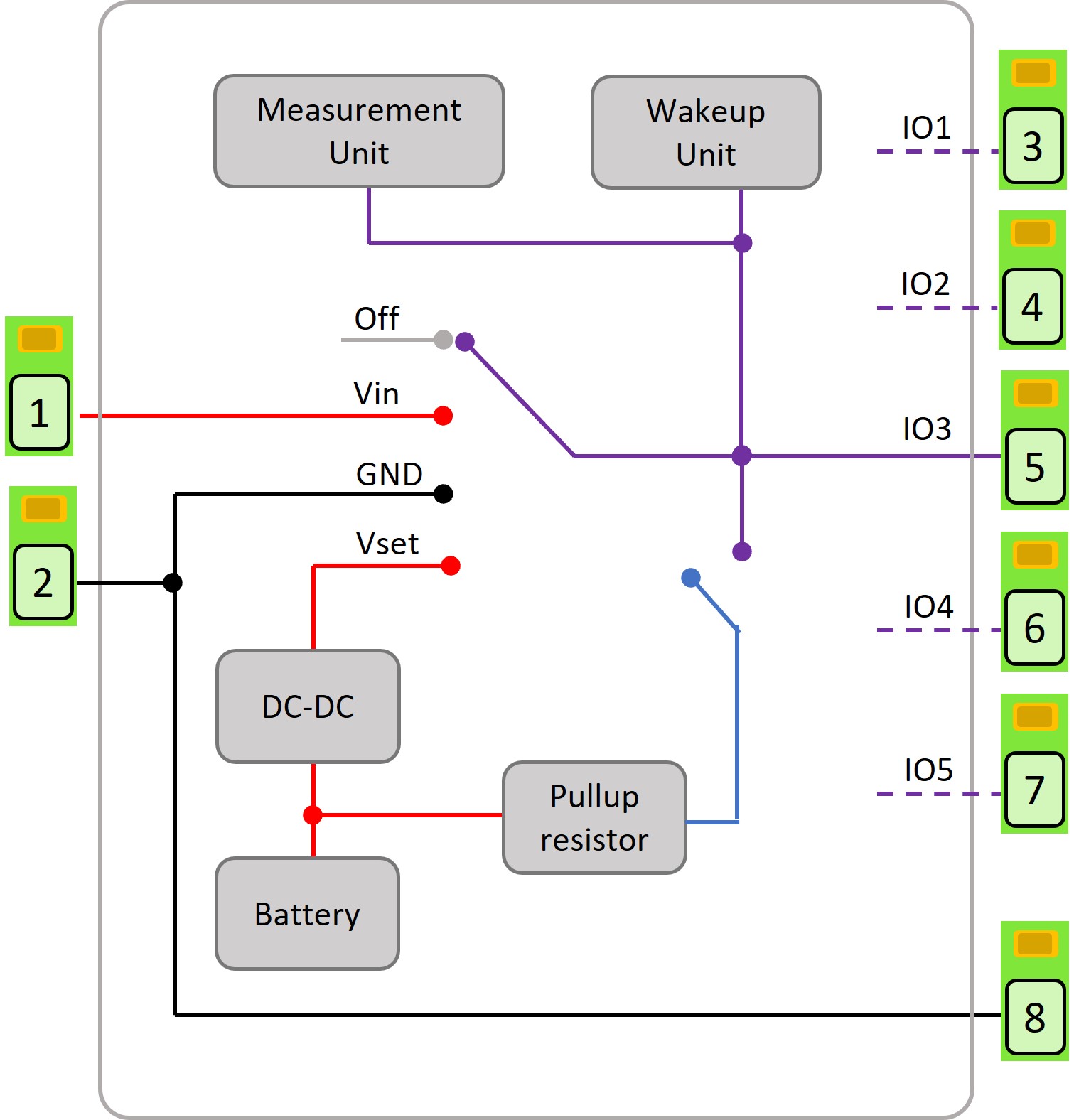
Simplified internal IO architecture
IO1 and IO2 can be configured to cause the device to exit sleep or hibernate mode when a change is detected.
If the Senquip device is reset, the IO states are unaffected. They hold their state until a change is applied. For example, if new script is loaded, forcing a reset, the IO state is held until the new script applies a change. In the case of a processor malfunction, the IO state will be reset after 30 seconds. IO states are reset to the default of off when entering hibernate or sleep.
Powering external devices
IO on the Senquip QUAD-C2 can be used to power and provide signals to external sensors, relays, lights, buzzers, and other devices. To permanently power an external device by supplying it with a voltage, set the IO Default State to VIN or VSET in which case the connected device will be permanently powered. To power a device by connecting it to ground, select GND as the Default State. The default state will continue to be applied between measurement cycles.
Alternatively, the IO can made to switch power on only at a measurement cycle, and for a defined period. To enable switched power, set the default for the IO to OFF and set the Measurement State to VIN or VSET. Set the Measurement Time as the time for which the externally connected sensor must be powered before being measured. This time is typically the boot time for a sensor. In this case, Vin or Vset will only be made available on the IO during a measurement interval and for the time specified. This is the preferred method for installs that are solar powered or have intermittent power. Measurement of CAN, RS232, and RS485 are delayed by the longest of all specified measurement times to allow for the case where an IO is being used to power a serially connected device.
The figure below shows an RS232 sensor that is powered by IO5 and measured on the RS232 port and a relay that is energised by setting an IO to ground.
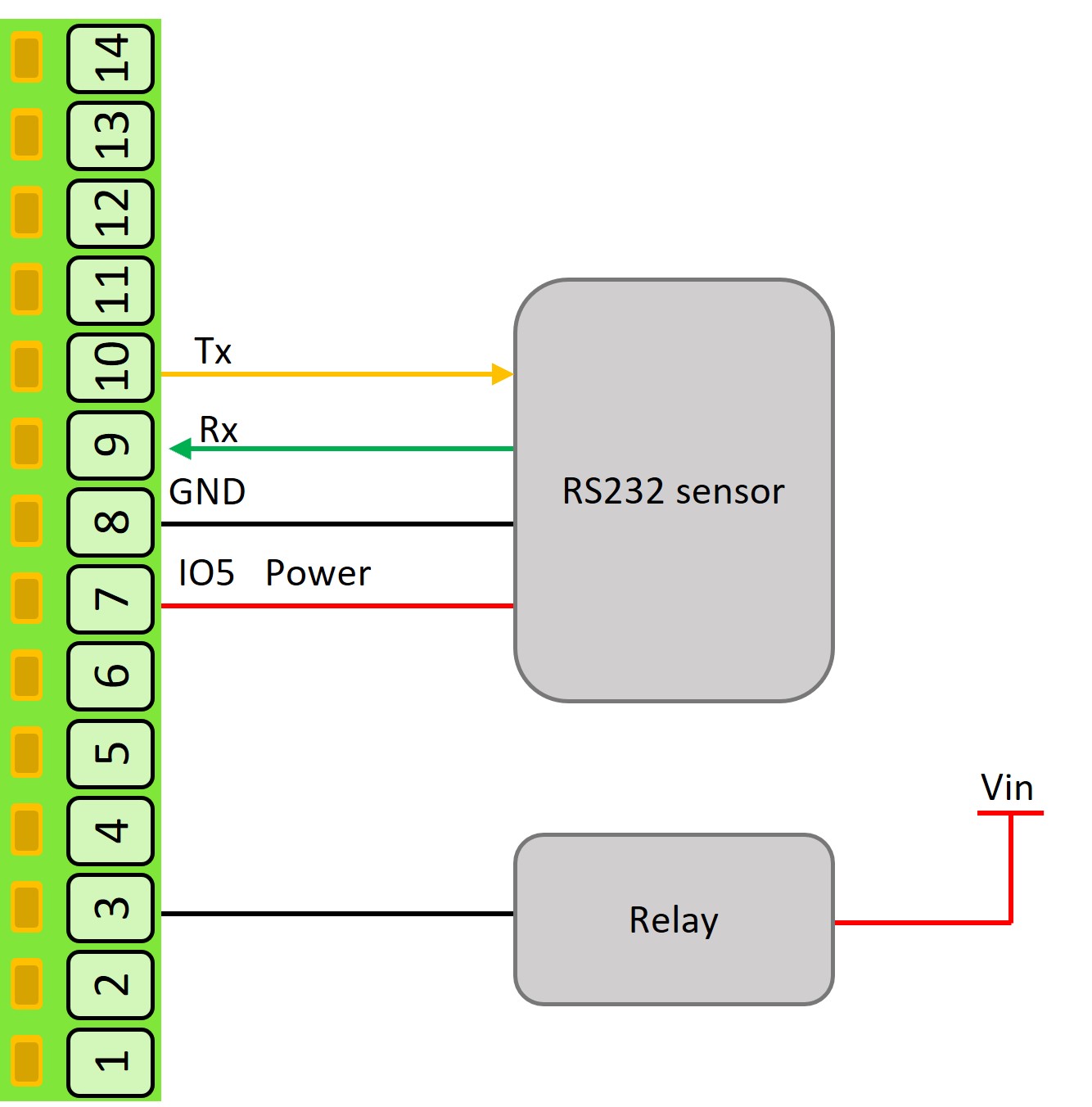
Powering external devices on an IO
Note
Where switched power is used to power a sensor that is read by another input, the Measurement Time specified for the IO and the input must be the same to ensure that the sensor is powered when measured.
For advanced users, the state of an IO can be switched from within a script. This allows for the control of complex sensors and systems and precise timing. If changes to the IO are made from within a script, the default settings will only be re-applied the next time the device boots.
Warning
If an IO is enabled in the settings, and is used in a script, the behaviour of that IO will be affected by both the settings and the script.
Note
In hibernate and sleep, the outputs default to OFF and the internal voltage booster is off. If a pullup has been enabled, it will remain on in sleep and hibernate.
Current Measurement
Loop powered (2-wire) and externally powered (3-wire) 4-20 mA devices can be used with the Senquip QUAD-C2.
For 2-wire devices, Vin or Vset power can be supplied by an IO and the current drawn measured by that same IO. A typical 2-wire install is shown in the figure below.
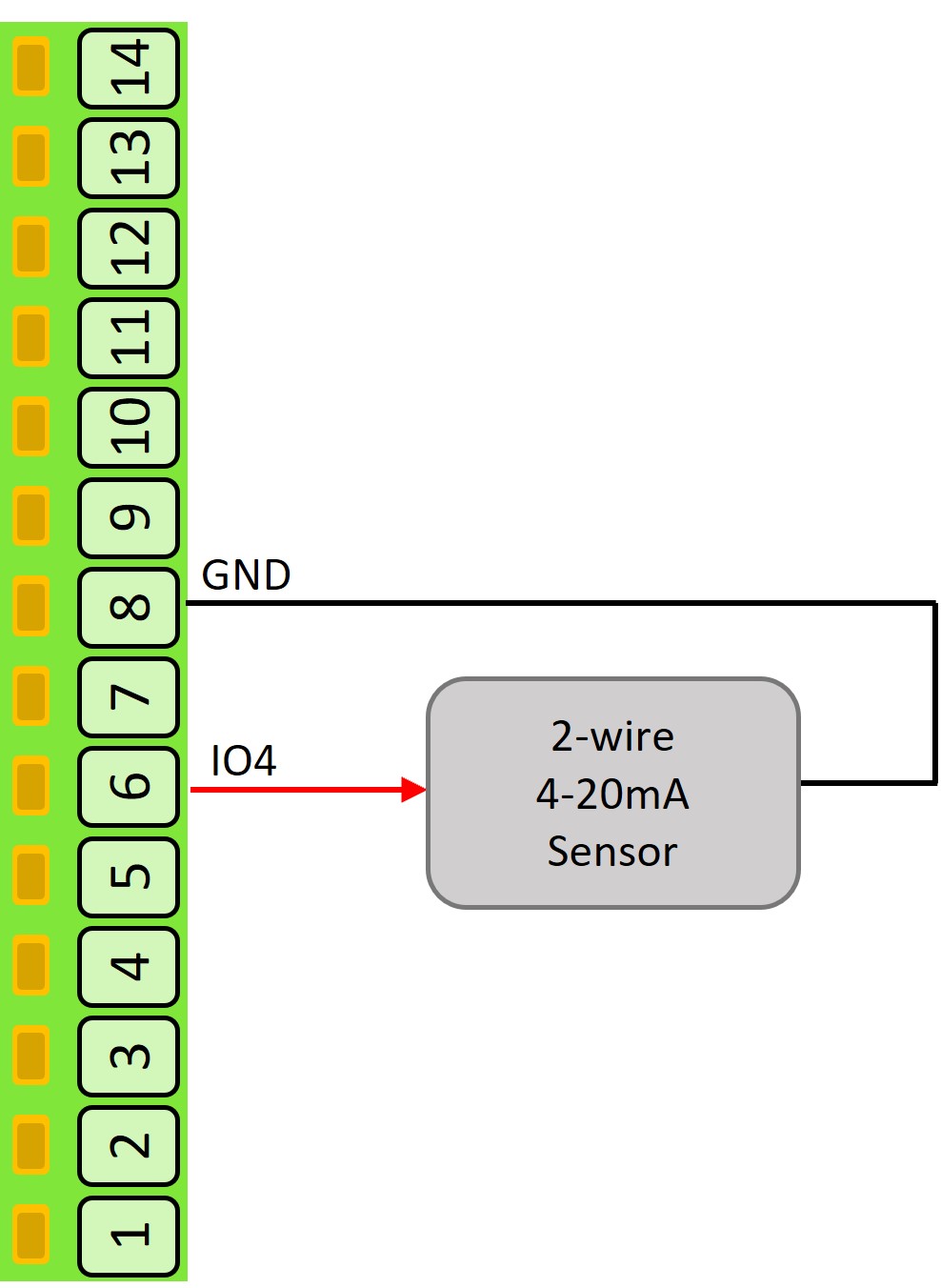
2-wire 4-20 mA device install
3-wire devices are externally powered as they typically draw more than 4 mA at a minimum and so are not suitable for loop powering. The Senquip QUAD-C2 can power a 3-wire device with Vin or Vset from one IO and measure the output current on a second IO. A typical 3-wire install in shown in the figure below.
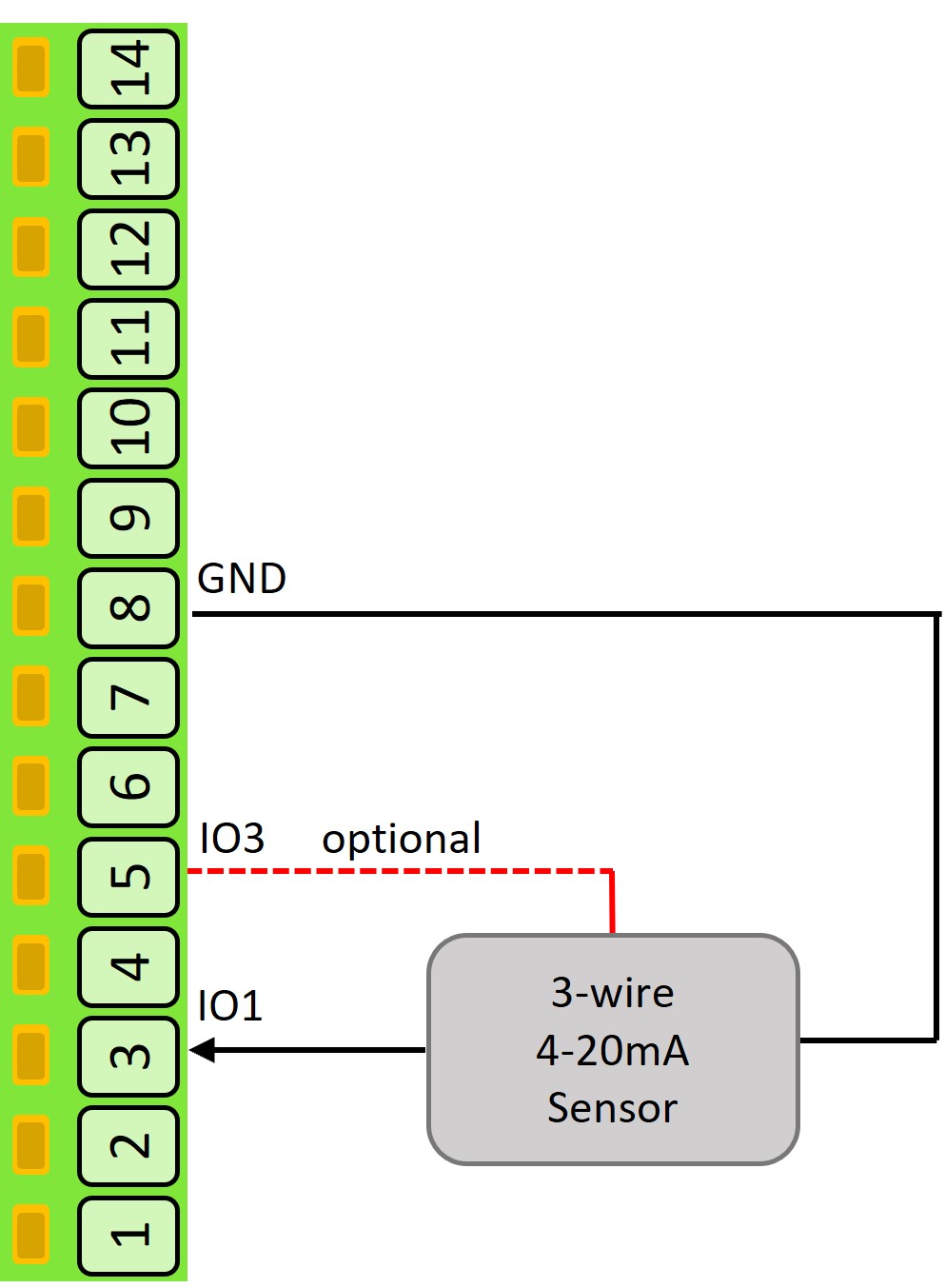
3-wire 4-20 mA device install
Current out of the IO terminal is defined as positive (2-wire) and current into the terminal (3-wire) is defined as negative. Although optimised for 4-20 mA, the IO can measure currents in the range -100mA to 100 mA.
Pulse Count Measurement
The Senquip QUAD-C2 can count pulses from devices like water-meters, rain guages, and speed-sensors. The inputs can be from voltage free contacts like reed switches, hall effect sensors, or pulse trains from powered devices. When connecting to voltage free switches, am optional pullup (wetting) resistor can be enabled in the settings. The Senquip QUAD-C2 can count pulses while awake and between cycles when sleeping. Although all IO can count in a very low power mode, IO1 and IO2 have additional circuitry that allows ultra low power pulse counting. Along with a total pulse count, frequency and duty cycle are also measured at the measurement interval.
The figure shows how to wire a voltage free contact and powered pulse train to the Senquip QUAD-C2 IO.
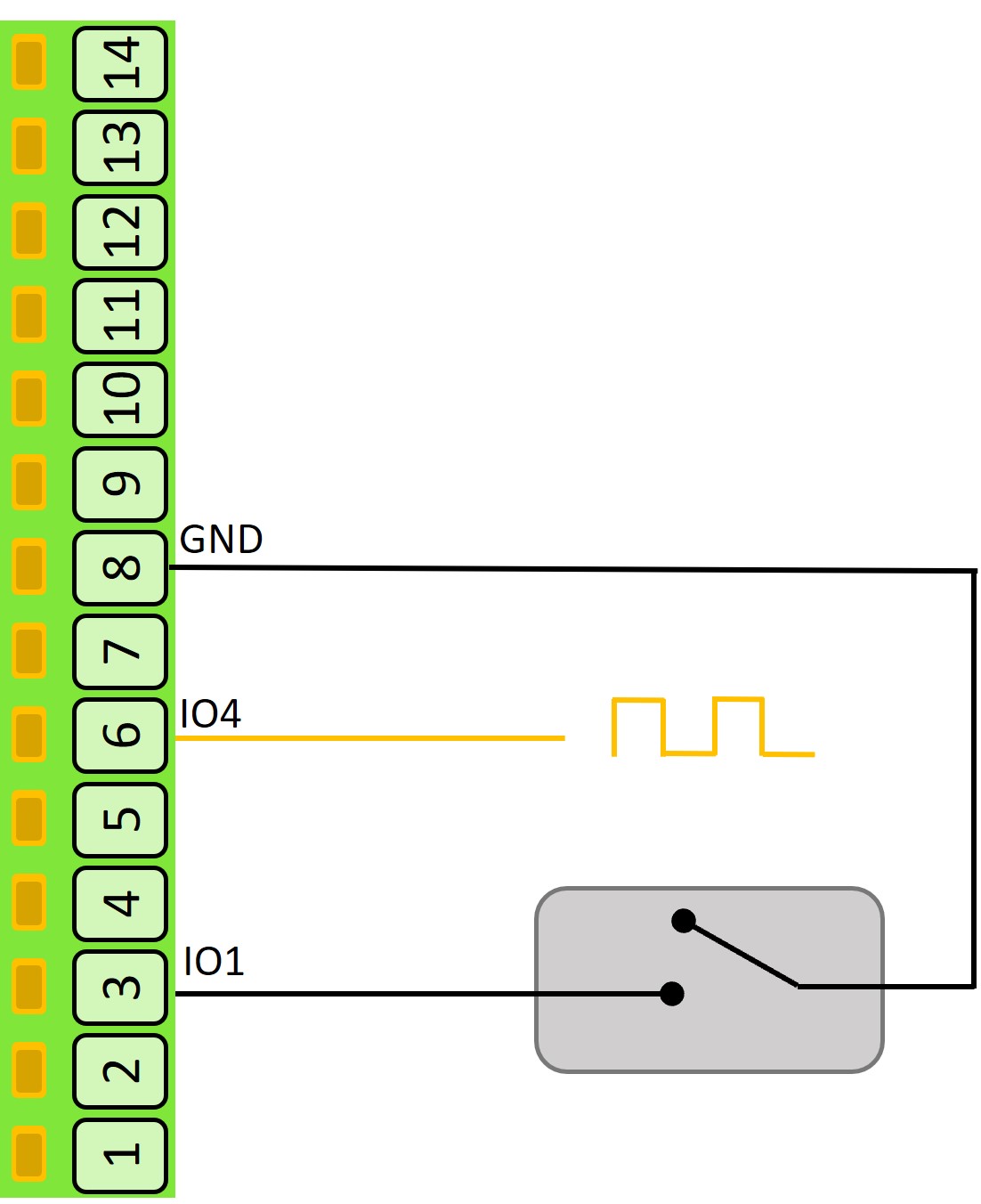
Pulse counting
Specification
Parameter |
Specification |
|---|---|
Output |
|
Vin source current maximum |
100 mA per pin |
Vset output voltage range |
5 to 25 V |
vset output voltage accuracy |
+/-400mV |
Vset source current maximum |
100 mA per pin, 100 mA total from Vset |
GND sink current maximum |
250 mA per pin |
Vout output voltage range |
0 to 10 V |
Vout output voltage accuracy |
+/-10mV preliminary |
Vout output current maximum |
25 mA preliminary |
Pullup resistor |
33k to 3.3 V |
IO terminal input impedance to ground (without pullup) |
>250k ohms |
Voltage Measurement |
|
Voltage ADC Type |
5 x 16 bit sigma delta |
Voltage range |
0-75VDC |
Voltage measurement resolution |
3.125 mV |
Voltage measurement accuracy (0-5 V, as measured) |
+/-0.005V |
Voltage measurement accuracy (0-75 V, as measured) |
+/-0.1V |
Threshold for IO to wake from hibernate |
>2.3 V |
Current Measurement |
|
Current ADC Type |
5 x 16 bit sigma delta |
Measurable current maximum (not optimised for 4-20 mA) |
+/-250mA (Do not exceed 100 mA when sourcing current) |
Overcurrent protection trip (not optimised for 4-20 mA) |
+/-250mA |
Current resolution (not optimised for 4-20 mA) |
+/-7.6uA (15 bits across 250 mA) |
Current accuracy (-100-100mA, as measured, not optimised for 4-20 mA) |
+/-100uA |
Measurable current maximum (optimised for 4-20 mA) |
+/-80mA |
Overcurrent protection trip (optimised for 4-20 mA) |
+/-80mA |
Current resolution (optimised for 4-20 mA) |
+/-7.6uA (15 bits across 80 mA) |
Current Accuracy (4-20 mA, as measured) |
+/-50uA |
Frequency and Pulse |
|
Frequency measurement range |
0.5 Hz to 5 kHz |
Frequency measurement accuracy |
1% |
Pulse counting detection threshold |
2.0 V |
Pulse counting maximum frequency in sleep |
100 Hz |
Pulse counting maximum frequency always on |
5 kHz |
Pulse minimum width |
1msec |
Duty cycle measurement range |
0% to 100% |
Duty cycle accuracy |
+/-0.5% (0.5 Hz to 500 Hz) |
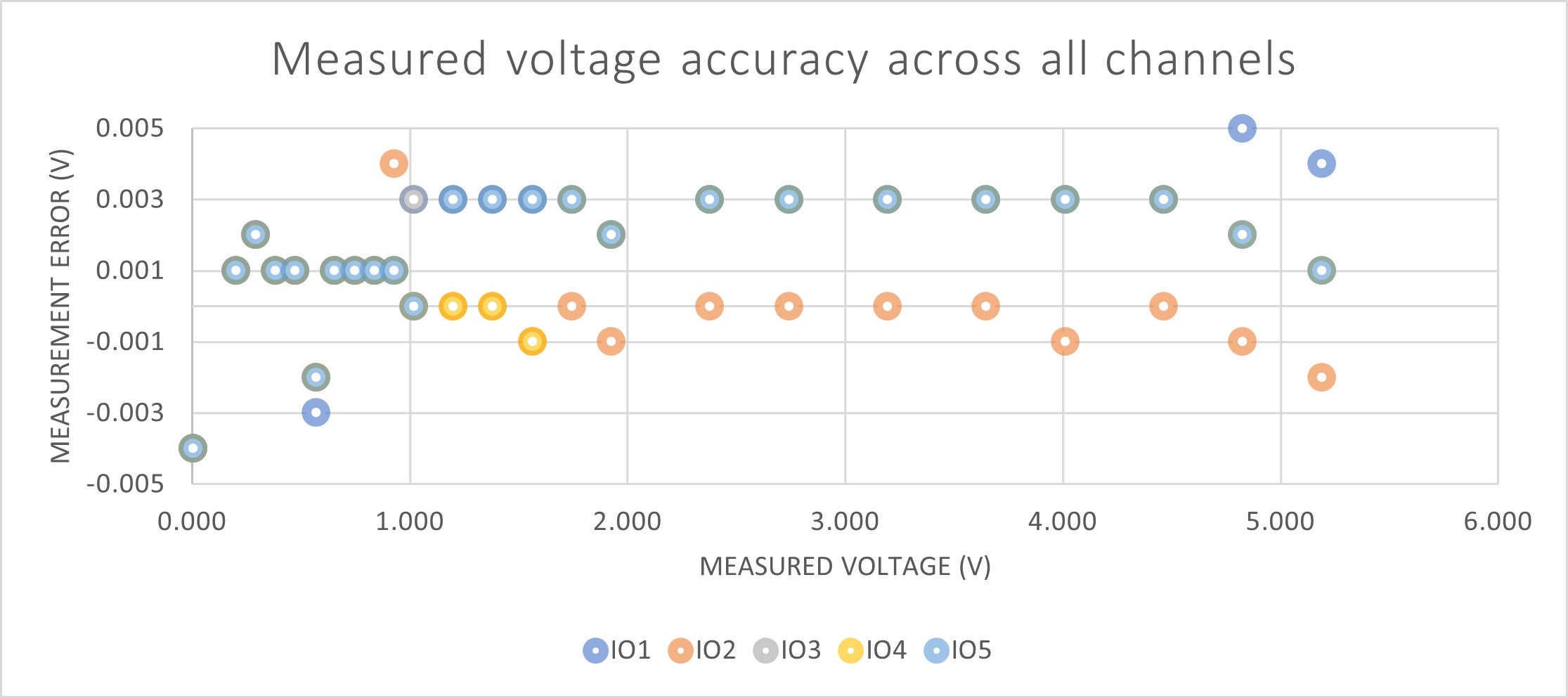
Voltage accuracy across all IO channels
Settings
Each IO block has an identical set of settings.
Measurements can be scheduled as a multiple of the base-interval. The fastest possible measurement rate is achieved by setting the Interval to 1 in which case measurements will occur on every base interval. To reduce power consumption, the measurement rate can be turned down by increasing the Interval. To turn an IO block off, set the Interval to 0.
On IO1 and IO2, turn on Wake on Change to wake the device from sleep or hibernate when the digital state of the input changes. It is recommended to also set the Default State to PULLUP.
The Default State can be set to OFF, GND, VIN, VSET or PULLUP.
The Measurement State can be set to No Change, OFF, GND, VIN, VSET or PULLUP. Where a measurement state is specified, a Measurement Time must be selected.
Each voltage, current, frequency, duty cycle, pulse count and digital measurement is turned on individually (for example Measure Voltage) and has its own calibration and alert settings.
A full list of IO settings is given in the table at the end of this chapter.
Serial interface
The serial port can be used to capture data that is sent from an external system or to interface to a MODBUS sensor.
The QUAD-C2 contains two terminals marked A / TX and B / RX on the interface header. The pins have functions that depend on the chosen interface as shown in the table below. When RS485 mode is chosen, an optional 120Ω termination resistor can be selected.
Interface type |
B / RX function |
A / TX function |
|---|---|---|
RS232 |
Receive (Rx) |
Transmit (Tx) |
RS485 |
RS485-B |
RS485-A |
Note
RS485-B is sometimes referred to as D+ or TX+/RX+ and RS485-A as D- or TX-/RX-.
The serial interface supports both RS232 and RS485 operation.
The interface incorporates protection features to improve robustness and reliability in industrial environment with the RS485 receiver offering full failsafe operation for floating, shorted, or terminated inputs.
Specification
Parameter |
Specification |
|---|---|
RS232 transmitter output low voltage (typical) |
-5.5V |
RS232 transmitter output high voltage (typical) |
+5.9 V |
RS232 input threshold voltage |
+1.5 V |
RS485 differential output voltage (minimum with load resistance 120Ω) |
+2 V |
RS485 differential input threshold (typical) |
+/-200mV |
Maximum nodes in RS485 mode |
256 |
RS485 termination resistor |
120Ω |
ESD protection |
+/-26kV |
Settings
Measurements can be scheduled as a multiple of the base-interval. The fastest possible measurement rate is achieved by setting the Interval to 1 in which case measurements will occur on every base interval. To reduce power consumption, the measurement rate can be turned down by increasing the Interval.
In serial capture mode the measurement interval can be used to reduce the number of readings being provided by a connected sensor or system that may be permanently powered. If for instance, a connected system is sending a message every second but it is only required to be read and transmitted every minute, the measurement interval can be set to 1 minute in which case the device will wake on the minute interval, receive a message and return to sleep thereby missing the other 59 messages sent by the attached system. Since serial packets cannot be interrogated by the QUAD-C2 without a customised script, it makes sense to set the measurement interval to the same as the transmit interval in most cases.
The serial port on the QUAD-C2 can be configured as an RS232 or RS485 hardware interface using the Type option.
An optional 120Ω RS485 termination resistor can be selected by turning on Termination Resistor. The purpose of the termination resistor is to match the impedance of a transmission line to the hardware impedance of the interface to which it is connected. Termination is generally not required in lower speed networks (9600 baud or less) and networks shorter than 500 m in length. No more than 2 termination resistors should be used, one at each end of the RS485 transmission line.
A baud rate of 4800, 9600, 19200, 38400, 56800 or 115200 needs to be selected using the Baud Rate option. Other settings, including the number of bits, odd or even parity and 1 or 2 stop bits are added in the Settings field. The most common setup is 8 bits, no parity and 1 stop bit or “8N1”.
The serial interface can be configured in serial capture mode or MODBUS mode using the Mode option.
Set Mode to Capture, Modbus or Scripted. In Scripted mode the serial port is controlled entirely from a script.
Capture mode is typically used where an external sensor sends serial data and a portion of that serial data is to be captured. MODBUS mode is used to connect to external sensors that are compatible with the MODBUS standard.
In serial capture mode, the device listens for periodic data and when received, transmits this data at the next send interval. The maximum length of a message that can be captured is 512 characters. Once 512 characters have been received, the QUAD-C2 will terminate the capture and will transmit it on the next transmit interval.
In capture mode, the Max Time setting can be used to set a timeout after which the serial port will return to sleep. Max Time can be used as a way to end serial measurement in the event that no serial data is received, or as a mechanism to allow the device to sample the serial port for a defined time-period.
Note
If the serial port needs to be kept on all the time, set the Max Time to longer than the measurement interval. The contents of the serial buffer is retained as long as the device does not return to sleep.
The operation of the Max Chars option is similar to the Max Time setting except that the serial port stops sampling after a certain number of characters has been received. In most cases where the Max Chars setting is used to terminate serial capture, the Max Time setting is also used to end the serial measurement in the event that data does not arrive.
In serial capture mode, in systems where many messages are sent and only a few are of interest, a Start String of up to 10 characters can be enabled. For instance, in a typical GPS serial NMEA feed, the following are a subset of available messages:
DTM - Datum being used.
GGA - Fix information
GLL - Lat/Lon data
GSA - Overall Satellite data
GSV - Detailed Satellite data
RMC - Recommended minimum data for GPS
RTE - Route message
VTG - Vector track an Speed over the Ground
If in the application, the user is only interested in receiving the GGA message, then a Start String can be set to GGA. In that way, any messages starting with DTM, GLL, GSA or other unwanted messages will be discarded.
Note
If a start string is enabled, the device will stay awake until the string is received or until the Max Time is reached.
In firmware revisions less than 2, serial start strings are specified as text, with special characters such as carriage return and line feed being specified by their respective escape sequences. A list of allowable escape sequences is given below:
\f Form-feed
\n Newline (Line Feed)
\r Carriage Return
\t Horizontal Tab
\v Vertical Tab
\\ Backslash
Note
Because escape sequences start with a backslash (\), if a capture string contains a backslash, it needs to be escaped and so is represented as a double backslash (\\).
In firmware release 2 and above, serial start strings are specified as text, with special characters such as carriage return and line feed being specified by their respective ASCII codes in hexadecimal. A list of example hexadecimal sequences is given below:
\x0C Form-feed
\x0A Newline (Line Feed)
\x0D Carriage Return
\x09 Horizontal Tab
\x0B Vertical Tab
\x08 Backslash
The change to the method used to represent special characters has been made to allow for all ASCII characters to be used, and to allow for hexadecimal data to be captured.
Note
In firmware revisions 2 and lower, special characters are specified as escape characters. In revisions 2 and above, special characters are represented by their ASCII representations in hexadecimal.
In some serial protocols, the start of a packet is specified by a preceding period of inactivity on the serial bus. The Idle Time Before Start parameter can be used to specify an idle time, which is exceeded will trigger the serial port to start capturing serial data.
Note
If the serial port is capturing data and a subsequent idle time occurs, the capture process will restart and captured data will be discarded.
A serial capture End String of up to 10 characters can also be provided. Again using the NMEA example, all NMEA messages end with a carriage return and line feed and so the serial capture stop strings in each case will be the same and will be “\r\n” or \x0D\x0A in revision 2 and above firmware. In most instances, the serial stop strings will be the same for all messages.
Note
If a Start String is specified without a End String, or the End String is never encountered, the serial port will capture characters until the Max Time or Max Chars is reached, the next measurement interval occurs or 256 characters are received.
An optional serial Request String can be sent, on each measurement interval, to an external device. The purpose of the Request String is to request data from an external sensor or system. The Request String can be a maximum of 10 characters and can be entered as text. Special characters like carriage return and line feed can be inserted using escape sequences or their ASCII representations as described earlier in the chapter.
The QUAD-C2 implements the MODBUS communications protocol standard as a master, which enables communication with many slave devices connected to the network. The QUAD-C2 can be configured to periodically request specific data from slave MODBUS devices on the network and transmit that data at specified intervals.
Up to fifty MODBUS data requests can be configured; these can be from individual slave devices or several requests to the same device. Each request is a row in the Modbus table, with a Slave Address, Function and Register Address. The Slave Address is set by the manufacturer of the connected device; some devices allow it to be changed. The Function sets the type of data to be read:
Function |
Reads |
|---|---|
Disabled |
The channel is not used. |
1: Read Coil |
A 1-bit coil. |
2: Read Discrete |
A 1-bit discrete input. |
3: Read Unsigned Holding (16-bits) |
One 16-bit holding register, unsigned. |
4: Read Unsigned Input (16-bits) |
One 16-bit input register, unsigned. |
Read Signed Holding (16-bits) |
One 16-bit holding register, signed. |
Read Signed Input (16-bits) |
One 16-bit input register, signed. |
Read Unsigned Holding (32-bits, … register order) |
Two holding registers as a 32-bit unsigned value. |
Read Unsigned Input (32-bits, … register order) |
Two input registers as a 32-bit unsigned value. |
Read Signed Holding (32-bits, … register order) |
Two holding registers as a 32-bit signed value. |
Read Signed Input (32-bits, … register order) |
Two input registers as a 32-bit signed value. |
Read IEEE-754 Float Holding (32-bits, … register order) |
Two holding registers as a 32-bit floating-point value. |
Read IEEE-754 Float Input (32-bits, … register order) |
Two input registers as a 32-bit floating-point value. |
Read IEEE-754 Double Holding (64-bits, … register order) |
Four holding registers as a 64-bit floating-point value. |
Read IEEE-754 Double Input (64-bits, … register order) |
Four input registers as a 64-bit floating-point value. |
Each 32-bit and 64-bit function is available in Little Endian and Big Endian register order.
Endianness is the order or sequence of bytes of digital data in computer storage and will be specified by the sensor that is being connected to the QUAD-C2.
A single MODBUS device may have multiple data values that can be read. The Register Address specifies which data the slave device needs to deliver.
In Modbus mode, calibration can be applied so that the registers read by the QUAD-C2 can be scaled to be in the units of what is being measured. For instance, a register that returns 0 to 255 may represent 0% humidity to 100% humidity. The QUAD-C2 can be calibrated to take a number and to convert it to humidity in % and return that as the measured value.
In any system, the sensor and possibly the measured value will be subject to errors that may accumulate to reduce accuracy. In a system that uses the QUAD-C2 to measure fluid volume in a 100 litre tank using a MODBUS sensor, the sensor may have offset errors such that with zero liquid in the tank, the QUAD-C2 is showing a small volume. The QUAD-C2 and sensor may also not be perfectly linear in that they may not measure 1 litre in exactly the same way when the tank is empty versus when it is full. The tank itself may also not be perfectly manufactured and may, for instance have walls that are not perfectly straight. All of these errors could add together such that the final system is less accurate than expected. To achieve a more accurate system, a calibration can be performed. In this example, the tank could be calibrated by adding a small amount of liquid, say 10 litres (low Y) and noting the value reported by the QUAD-C2 (low X). Now fill the tank by adding another 99 litres (high y) and note the value being reported by the QUAD-C2 (high X). By filling the high and low X and Y values into the calibration for that MODBUS channel, offset and non-linearity errors can be eradicated, resulting in a much more accurate system.
In Modbus mode, warning and alarm thresholds can be set for each MODBUS channel. Once enabled, each time a measurement is completed, the returned value will be compared with minimum and maximum warning and alarm thresholds. If a warning or alarm level is breached, a message will immediately be transmitted. As long as the warning or alarm condition persists, messages will be transmitted at the exception-interval rather than the transmit-interval.
Note
If calibration has been applied, then the warning and enable thresholds are in the calibrated units.
A full list of serial interface settings is given in the table at the end of the chapter.
CAN Bus interface
The Senquip QUAD-C2 is equipped with CAN bus that can be used to read data from all kinds of vehicles and sensors. Many sensors, controllers, and electronic devices can be connected to a single CAN network.
In many cases, the protocol that is being used on the CAN bus is known, and so large volumes of understandable data can be extracted from all kinds of vehicles. Common CAN protocols include:
J1939, the dominating CAN-based protocol for trucks and busses.
ISO 11783, a J1939 flavor for agricultural tractors.
ISO 11992, an interface between trucks and trailers.
NMEA 2000, a protocol based on J1939 for marine use.
CANopen, provides a standard for industrial machinery commonly used in industrial automation.
The CAN interface on the QUAD-C2 supports Classical CAN and CAN FD (Flexible Data-rate). Pins 11 and 12 are for the CAN1 interface, and pins 13 and 14 for the CAN2 interface with pin 11 and 13 being CAN High (dominant high) and pin 12 and 14 being CAN Low (dominant low).
Pin |
Function |
|---|---|
11 |
CAN1 H |
12 |
CAN1 L |
13 |
CAN2 H |
14 |
CAN2 L |
In CAN networks, 120Ω termination resistors are installed at each end of the network. In most installations, the required termination will already be present and the internal termination resistor should remain disabled. If the QUAD-C2 is located at the end of a CAN network and termination is required, the internal termination resistor can be enabled in the CAN settings. No external termination resistor is required.
Warning
In CAN bus systems, the ground supplied to the Senquip QUAD-C2 must be the same ground as used by the CAN network. High differential voltages between the CAN lines and ground can damage the CAN interface.
Specification
Parameter |
Specification |
|---|---|
CAN physical layer |
High-speed CAN (ISO 11898-2 compatible) |
Supported protocols |
Classical CAN and CAN FD |
Maximum Classical CAN bit rate |
1Mbit/s |
Maximum CAN FD data rate |
4Mbit/s |
Bus fault protection on CAN High and CAN Low |
+/-60V |
ESD protection, CAN bus pins |
+/-25kV |
Termination resistor |
120Ω |
Settings
Measurements can be scheduled as a multiple of the base-interval. The fastest possible measurement rate is achieved by setting the Interval to 1 in which case the CAN network will be sampled on every base interval. To reduce power consumption, the measurement rate can be turned down by increasing the Interval.
The CAN bus peripheral on Senquip devices supports can bit rates of 125kbit/s, 250kbit/s, 500kbit/s and 1Mbit/s as specified in the Nominal Baud Rate field.
Configurable internal 120Ω termination resistors can be enabled.
To ensure minimum intrusion on CAN systems, the CAN peripheral can be set to listen only. In this mode the Senquip device will only receive messages that are acknowledged on the bus by a listening node. Where required, the Senquip device can be made to acknowledge messages by selecting the TX Enable option.
The Capture Time setting can be used to set a timeout after which the CAN bus peripheral will stop listening, allowing the Senquip device to transmit received messages and return to sleep. capture-time can also be used as a mechanism to allow the CAN peripheral to sample the CAN bus for a defined time-period.
A full list of CAN bus settings is given in the table at the end of this chapter.
CAN Filters
Most automotive CAN networks transmit hundreds of different messages, each with a unique identifier. The Senquip device allows you to filter and capture only the messages you need using the ID Capture List.
Basic Usage
Enter the CAN IDs you want to capture in hexadecimal, separated by commas. For example:
18FF20F2,18FF36F0,18FF1BF2
During each measurement interval, the device listens for the listed messages until either all are received or the Capture Time expires.
Capturing Multiple Messages
To capture multiple messages with the same ID, use * followed by the number of each message required:
18FF20F2*4,18FF1BF2*10
This captures:
4 messages with ID
18FF20F210 messages with ID
18FF1BF2
To capture all messages of a certain ID received during the interval, use * without a number:
18FF1F12*
Wildcards and Advanced Filters
??can replace the Priority or Source Address in a J1939 ID.For example:
??FECA??
This matches any J1939 message with a PGN of
FECA, regardless of Priority or Source Address.#can be placed at the end of the list to match one of any other message not already listed:18FE1451*4,18FE1256*2,#
This captures:
4 messages with ID
18FE14512 messages with ID
18FE12561 of every other unique ID not already matched
Special Cases
Leave the list
blankto capture one of every message that arrives.Use a single
*to capture all messages, in the order they arrive.Warning
Capturing all messages may overwhelm the device in high-traffic CAN systems. The number of messages that can be captured in a measurement cycle is internally limited to 128.
Limits
Up to 128 messages are captured in each measurement cycle.
The ID Capture List can be up to 200 characters long.
Sending CAN Messages
CAN messages can be sent to connected device from within a script. The messages can be sent once, or can be set to repeat at a given time interval. If the device enters sleep or hibernate, repeating messages will be stopped. If the Senquip device is reset, the sending of repeating CAN messages is unaffected. The messages will continue to be sent until a change is applied. For example, if new script is loaded, forcing a reset, the CAN messages will continue to be sent until the new script applies a change. In the case of a malfunction that lasts for more than 30 second, repeating CAN messages will be stopped.
Note
To send CAN messages, the TX Enable option must be selected.
Calibration
Calibration can be applied to each measurement so that the value returned by the Senquip QUAD-C2 is in units that are meaningful in the end application. For instance, a fuel level sensor that outputs a voltage between 0 and 5 V may represent a level between 0 and 100 litres of diesel. The voltage measurement can be calibrated to convert from Volts to the more meaningful unit of litres.
In any system, the measurement instrument (the Senquip QUAD-C2), the sensor and possibly the measured value will be subject to errors that may accumulate to reduce accuracy. In a system that measures fluid volume in a 100 litre tank using a 4-20 mA sensor, offset errors may result in a non-zero or negative reading when the tank is empty. Sensor gain may also not be perfectly linear and so a 1 litre change may be measured differently when the tank is empty versus when it is full. The sensor may report in inches of liquid height where a more meaningful unit may be litres. To achieve an accurate and meaningful measurement, a calibration can be performed.
In this example, the tank could be calibrated by adding a small amount of liquid, say 10 litres at which point the current measured may be 4.1 mA. Now add more liquid to take the level to say 80l. The sensor now reads 16.2 mA. The calibration would then be filled into the IO setting as shown below:
Low In |
4.1 |
This is the value in mA measured by the Senquip QUAD-C2 |
Low Out |
10 |
This is the actual value that we would like to report |
High In |
16.2 |
This is the value in mA measured by the Senquip QUAD-C2 |
High Out |
80 |
This is the actual value that we would like to report |
Unit |
l |
The unit to be reported is litres |
Unit Names and Symbols
The calibration Unit field supports plain text together with a number of commonly used engineering symbols. This allows measurements to be displayed using familiar units such as °C, m³, Ω, µS/cm and N·m.
The following characters are supported:
Letters: a-z, A-Z
Numbers: 0-9
Symbols: /, Ω, ·, µ, Δ, ±, ×, :, °, ², ³, ., %, _, -
Examples:
Unit |
Description |
|---|---|
V |
Volts |
A |
Amps |
°C |
Degrees Celsius |
°F |
Degrees Fahrenheit |
Ω |
Ohms |
kΩ |
Kilohms |
m³ |
Cubic metres |
m² |
Square metres |
µS/cm |
Microsiemens per centimetre |
N·m |
Newton metres |
kg/m³ |
Density |
%RH |
Relative humidity |
L/min |
Litres per minute |
When entering units on Windows, some special characters can be entered using their ALT codes on the numeric keypad.
Character |
Windows ALT Code |
|---|---|
° |
|
² |
|
³ |
|
µ |
|
± |
|
× |
|
The remaining symbols can be copied directly from this guide or inserted using the Windows Character Map (charmap.exe) or the Windows Emoji & Symbols panel(Win+.).
Character |
Description |
|---|---|
Ω |
Ohm |
Δ |
Uppercase Delta |
· |
Middle dot |
Warnings and Alarms
Each measurement has one alert setting. It is made up of an Alert Type, a Low Threshold, a High Threshold and a Hysteresis. Each time a measurement is completed, it is compared with the thresholds. If it is at or below the low threshold, or at or above the high threshold, an event of the selected type is raised and a message is transmitted immediately. While the event stays active, messages are transmitted at the Exception Interval.
Alert Type |
Result when a threshold is crossed |
|---|---|
Disabled |
No event. The thresholds are ignored. |
Info |
Event recorded in the device event history; no badge on the Senquip Portal. |
Alert |
Event shown with a blue indicator. |
Warning |
Event shown with an orange indicator. |
Alarm |
Event shown with a red indicator. |
The same alert type applies to both thresholds. To check only one threshold, leave the other one blank. For example, for a high-only warning at 50 V, set Alert Type to Warning, leave Low Threshold blank and set High Threshold to 50.
Some alerts, such as the light sensor’s Tamper Alert, have no thresholds: choose the alert type for the event only.
For how each alert type is shown and forwarded by email or SMS, see Exceptions.
Note
If calibration has been applied, set the thresholds in the calibrated units.
Hysteresis
Hysteresis prevents repeated alarms when a measured value fluctuates near a threshold. The hysteresis value is applied on both sides of the configured threshold. For an upper alarm, the value must reach upper threshold + hysteresis to enter the alarm state, then fall to upper threshold - hysteresis to clear it. For a lower alarm, the value must fall to lower threshold - hysteresis to enter the alarm state, then rise to lower threshold + hysteresis to clear it. Between the two switching points, the alarm retains its current state. Hysteresis uses the measurement configured units.
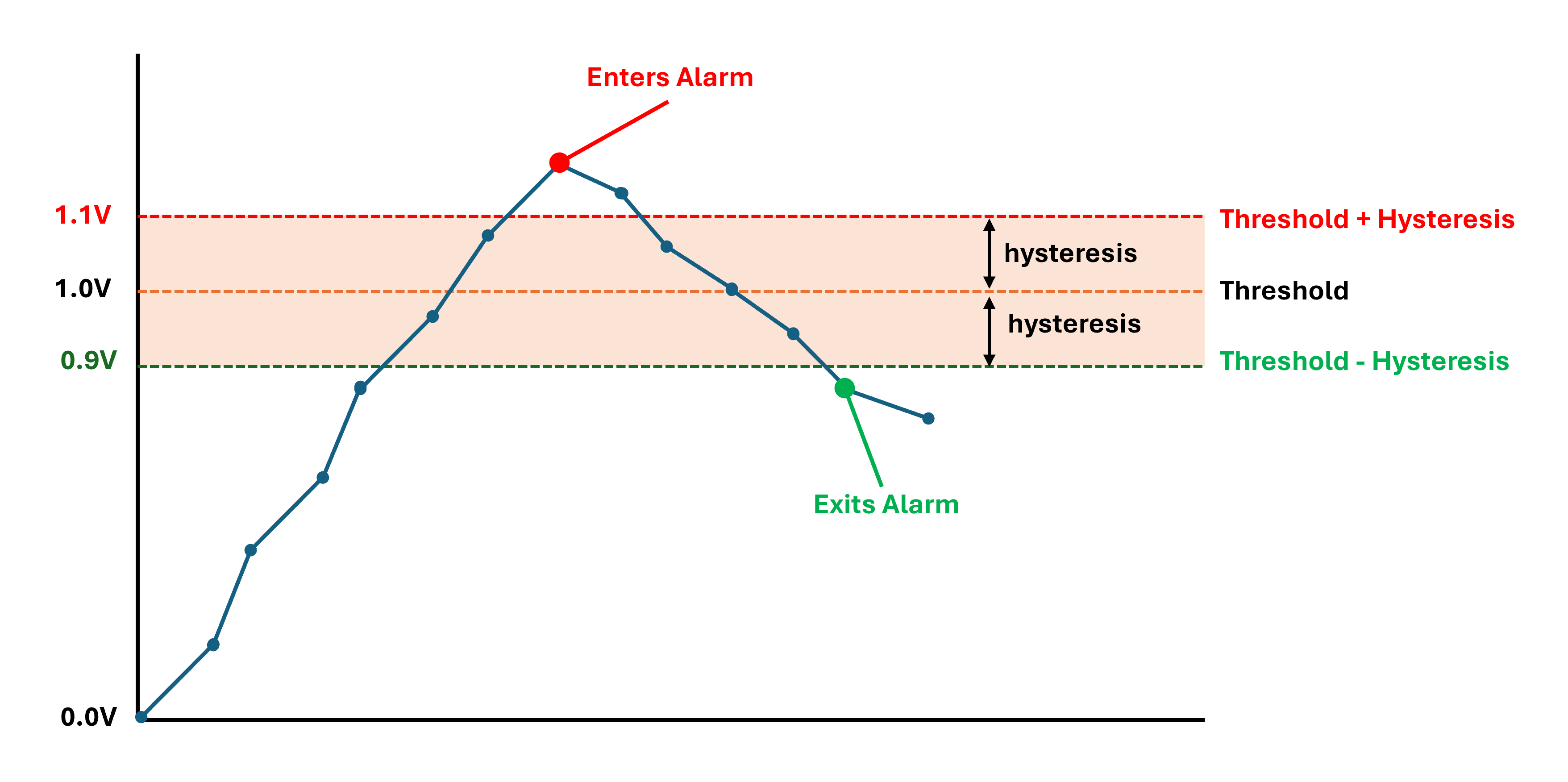
Upper alarm with a 1.0 V threshold and 0.1 V hysteresis. The alarm starts when the measured value reaches 1.1 V and clears when it falls to 0.9 V. Between those values, the alarm retains its current state. Readings shown in red are in alarm.
External Interface Settings
A full list of external interface settings is given in the table below.
Name |
Type |
Description |
Range or options |
Default |
Internal Reference |
|---|---|---|---|---|---|
General IO |
|||||
VSET Voltage |
Decimal |
The voltage setting of the internal voltage supply to IO terminals. |
5 to 25 Volts |
12 |
vset.voltage |
Overcurrent Protection |
On/Off |
Enable overcurrent protection on IO terminals. If enabled, the device will disable the IO if the current exceeds a threshold. |
On |
io.overcurrent_protection |
|
IO1 to IO5 (as fitted) |
|||||
Name |
Text |
A name for the input that is meaningful to the user. |
25 characters |
IO1 |
ioN.name |
Interval |
Integer |
The number of base intervals after which the input is sampled. A value of 1 means that the input is collected every base interval. Set to 0 to disable. |
0 to 10000 |
0 |
ioN.interval |
Wake on Change |
On/Off |
Wake device from sleep/hibernate on digital change. It is recommended to also enable PULLUP mode for this feature. |
Off |
ioN.wake |
|
Default State |
Option |
The state of the output when NOT in an active measurement interval. |
OFF, GND, VIN, VSET, PULLUP |
OFF |
ioN.output.default_state |
Measurement State |
Option |
The state of the output during an active measurement interval. |
No Change, GND, VIN, VSET |
No Change |
ioN.output.meas_state |
Measurement Time |
Decimal |
How long the IO will stay in the Measurement State before measurements are taken. |
0 to 3600 Seconds |
0 |
ioN.output.meas_time |
Measure Digital Input |
On/Off |
Enables digital input measurement on terminal. |
Off |
ioN.digital.enable |
|
Measure Voltage |
On/Off |
Enables voltage measurement on terminal. |
Off |
ioN.voltage.enable |
|
Voltage Calibration |
Calibration |
Calibration parameters. Refer to user guide. |
30 characters Volts |
0,10,0,10,Volts |
ioN.voltage.cal |
Voltage Alert |
Alert |
Alert type, low and high thresholds and hysteresis. See Warnings and Alarms. |
ioN.voltage.alert |
||
Measure Current |
On/Off |
Enables current measurement on terminal. |
Off |
ioN.current.enable |
|
Optimise for 4-20 mA |
On/Off |
Use a lower Full Scale Range (FSR) with higher resolution which is best for 4-20 mA devices. |
On |
ioN.current.low_range |
|
Current Calibration |
Calibration |
Calibration parameters. Refer to user guide. |
30 characters mA |
0,10,0,10,mA |
ioN.current.cal |
Current Alert |
Alert |
Alert type, low and high thresholds and hysteresis. See Warnings and Alarms. |
ioN.current.alert |
||
Measure Frequency |
On/Off |
Enables frequency measurement on terminal. |
Off |
ioN.freq.enable |
|
Frequency Calibration |
Calibration |
Calibration parameters. Refer to user guide. |
30 characters Hz |
0,10,0,10,Hz |
ioN.freq.cal |
Frequency Alert |
Alert |
Alert type, low and high thresholds and hysteresis. See Warnings and Alarms. |
ioN.freq.alert |
||
Measure Duty Cycle |
On/Off |
Enables duty cycle measurement on terminal. |
Off |
ioN.duty.enable |
|
Duty Cycle Calibration |
Calibration |
Calibration parameters. Refer to user guide. |
30 characters Percent |
0,10,0,10,Percent |
ioN.duty.cal |
Duty Cycle Alert |
Alert |
Alert type, low and high thresholds and hysteresis. See Warnings and Alarms. |
ioN.duty.alert |
||
Measure Pulse Count |
On/Off |
Enables pulse count measurement on terminal. |
Off |
ioN.pulse.enable |
|
Pulse Count Calibration |
Calibration |
Calibration parameters. Refer to user guide. |
30 characters Counts |
0,10,0,10,Counts |
ioN.pulse.cal |
Pulse Count Alert |
Alert |
Alert type, low and high thresholds and hysteresis. See Warnings and Alarms. |
ioN.pulse.alert |
||
CAN 1 |
|||||
Name |
Text |
A name that is meaningful to the user. |
25 characters |
CAN 1 |
can1.name |
Interval |
Integer |
The number of base intervals after which the CAN module is turned on. Set to 0 to disable. |
0 to 10000 |
0 |
can1.interval |
Nominal Baud Rate |
Integer |
Baud rate for CAN communication. Supported values are: 125, 250, 500, 1000 |
250 |
can1.nominal_baud |
|
CAN FD Mode |
Option |
Select CAN FD mode. |
Classic, CAN FD, CAN FD BRS |
Classic |
can1.frametype |
Capture Time |
Integer |
The device will capture matching messages for this length of time. |
2 |
can1.capture_time |
|
TX Enable |
On/Off |
Allows the device to transmit and acknowledge messages on the CAN bus. |
Off |
can1.tx_enable |
|
ID Capture List |
Text |
List of IDs to be captured in HEX format, separated by a comma eg: 18FEE60A. Leave blank to capture all. |
200 characters |
can1.id_list |
|
Send Raw Data |
On/Off |
Send all captured data in the standard data message. If unticked, data is only delivered to the scripting handler. |
Off |
can1.send_data |
|
Termination Enable |
On/Off |
Enables termination resistor for the CAN bus. |
Off |
can1.termination |
|
CAN 2 |
|||||
Name |
Text |
A name that is meaningful to the user. |
25 characters |
CAN 2 |
can2.name |
Interval |
Integer |
The number of base intervals after which the CAN module is turned on. Set to 0 to disable. |
0 to 10000 |
0 |
can2.interval |
Nominal Baud Rate |
Integer |
Baud rate for CAN communication. Supported values are: 125, 250, 500, 1000 |
250 |
can2.nominal_baud |
|
CAN FD Mode |
Option |
Select CAN FD mode. |
Classic, CAN FD, CAN FD BRS |
Classic |
can2.frametype |
Capture Time |
Integer |
The device will capture matching messages for this length of time. |
2 |
can2.capture_time |
|
TX Enable |
On/Off |
Allows the device to transmit and acknowledge messages on the CAN bus. |
Off |
can2.tx_enable |
|
ID Capture List |
Text |
List of IDs to be captured in HEX format, separated by a comma eg: 18FEE60A. Leave blank to capture all. |
200 characters |
can2.id_list |
|
Send Raw Data |
On/Off |
Send all captured data in the standard data message. If unticked, data is only delivered to the scripting handler. |
Off |
can2.send_data |
|
Serial 1 |
|||||
Name |
Text |
A name for the input that is meaningful to the user. |
25 characters |
Serial 1 |
serial1.name |
Interval |
Integer |
The number of base intervals after which the serial port is turned on. Set to 0 to disable. |
0 to 10000 |
0 |
serial1.interval |
Type |
Option |
The electrical interface type. |
RS232, RS485 |
RS232 |
serial1.type |
Termination Resistor |
On/Off |
This parameter enables the integrated termination resistor. |
Off |
serial1.termination |
|
Mode |
Option |
Describes how the serial port is to be handled. CAPTURE: serial data is captured between start and end characters. MODBUS: serial data is treated according to MODBUS RTU standard |
Capture, Modbus, Scripted |
Capture |
serial1.mode |
Baud Rate |
Integer |
Baud rate for serial communication. Common values are: 4800, 9600, 19200, 38400, 57600, 115200 |
57600 |
serial1.baud |
|
Settings |
Text |
A string describing the number of bytes: 7,8,9. Parity type: N(none), E(even), O(odd). Number of stop bits: 1 or 2. Typically: 8N1 |
8N1 |
serial1.settings |
|
Capture |
|||||
Start String |
Text |
The serial port starts reading data when it detects these characters. Example: $GPGGA, serial data will be ignored until $GPGGA is received after which data will be captured. If nothing is specified, the serial port will capture all data until the timeout period is reached. |
32 characters |
serial1.capture.start |
|
Idle Time Before Start |
Integer |
For a valid start condition, there must be this amount of idle time before receiving serial data. Additionally, the captured data will restarted if the serial port is idle for this time. Set to 0 to disable. |
0 to 60000 Milliseconds |
0 |
serial1.capture.start_idle_time |
End String |
Text |
Once capturing, if these characters are received, the serial port will stop capturing and will return to sleep. For binary data or escape sequences refer to the User Guide. |
32 characters |
serial1.capture.end |
|
Request String |
Text |
This string will be sent when the serial port is first turned on. Use this function to request data from a remote module. |
32 characters |
serial1.capture.request |
|
Max Time |
Integer |
The device will wait this length of time for a valid capture. |
5 |
serial1.capture.maxtime |
|
Max Chars |
Integer |
Maximum number of characters to be captured before the serial port goes back to sleep. |
to 2000 |
500 |
serial1.capture.maxchars |
Capture Alert |
Alert |
Alert type for this event. See Warnings and Alarms. |
serial1.capture.alert |
||
Modbus RTU |
|||||
Slave Timeout |
Decimal |
How long to wait for a response from each slave device. |
0.1 to 10 Seconds |
0.2 |
serial1.modbus.timeout |
Delay Between Reads |
Integer |
Delay between successive read commands. |
10 to 10000 Milliseconds |
15 |
serial1.modbus.framedelay |