General Setup
Measurement and Transmit Intervals
The ORB-C1 can be configured to take periodic measurements and then to transmit those measurements at various intervals or on exception. When not measuring or transmitting, the ORB-C1 will remain in a very low power state, referred to as sleep. For example, the ORB-C1 can be configured to measure temperature at 1 minute intervals, but only to transmit the temperature once an hour or if a warning or alarm level is exceeded (an exception occurs). By allowing a more regular measurement interval and a less frequent transmit interval, the ORB-C1 is able to reduce power consumption by remaining asleep, thereby maximising battery life. In the event of an exception, a more regular transmit rate can be selected.
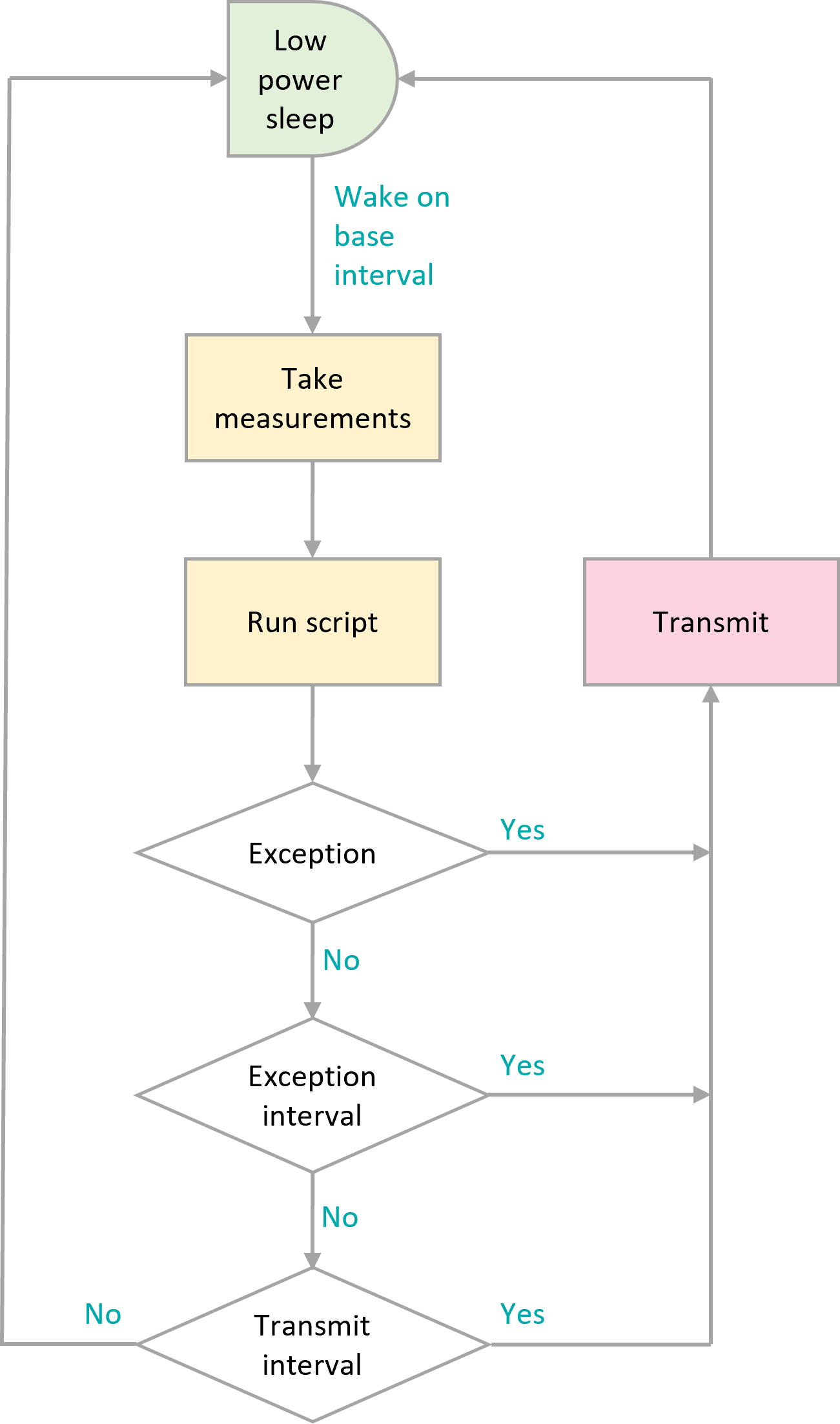
Timing flowchart
Green: Lowest power state; aim to configure the ORB-C1 to spend maximum time in this state.
Orange: Moderate power usage; try to reduce the number of times that the ORB-C1 wakes to measure sensors.
Pink: Highest power consumption; only transmit data when required.
A summary of wake sources and their behaviour in sleep and hibernate is given in the table below.
Wakeup Source |
Source Description |
Behaviour from Sleep |
Behaviour from Hibernate |
|---|---|---|---|
Vin |
The supply voltage rises above 9.5V |
No effect |
Device wakes, exits Hibernate Mode and runs normally. |
Setup Button |
The SETUP button is pressed. |
Device wakes and enters Setup Mode |
Device wakes and enters Setup Mode |
Light |
Tamper Alert is enabled and the lid is opened allowing light on the light sensor. |
Device wakes and runs normally (with tamper alert event active) |
Device wakes, and runs normally. It will re-enter Hibernate after the Hibernate Delay Interval if supply voltage is low. |
Vibration |
Wake on Vibration setting is enabled and vibration is recorded above the Vibration Threshold |
Device wakes and runs normally |
Device wakes, and runs normally. It will re-enter Hibernate after the Hibernate Delay Interval if supply voltage is low. |
Magnet (SETUP Mode) |
Magnetic Switch setting is set to Setup and a magnet is detected on the switch position. |
Device wakes and enters Setup Mode |
Device wakes and enters Setup Mode |
Magnet (WAKE Mode) |
Magnetic Switch setting is set to Wake and a magnet is detected on the switch position. |
Device wakes and runs normally |
Device wakes, and runs normally. It will re-enter Hibernate after the Hibernate Delay Interval if supply voltage is low. |
Magnet (TRIGGER Mode) |
Magnetic Switch setting is set to Trigger and a magnet is detected on the switch position. |
Device wakes and runs normally. Trigger 0 is executed. |
Device wakes, and runs normally. Trigger 0 is executed. It will re-enter Hibernate after the Hibernate Delay Interval if supply voltage is low. |
To allow flexible measurement and transmit intervals, whilst ensuring the lowest possible power consumption, the ORB-C1 has three global and one per-peripheral measurement interval settings.
Base-Interval The base-interval is the period of time after which the ORB-C1 will wake from sleep in order to check if there are any measurements to perform or if it is time to transmit the latest measured data. In a system where measurements are required often, the base-interval can be as low as 5 seconds. In systems that are slow to respond, the base interval can be as high as 24 hours. It makes sense to set the base interval as long as possible to enable the ORB-C1 to spend as much time as possible in a low-power sleep state.
Each peripheral, whether internal to the ORB-C1 or attached to the interface, can be set to only be measured after a number of base-intervals. If a particular peripheral has the interval setting set to 1, then it will be measured at each base-interval. If the interval is set to 0, then that particular peripheral will be turned off. Each time a measurement is taken, the results will be compared with alert, warning and alarm conditions and if an alert or exception occurs, the results will immediately be transmitted.
Note
if a base-interval of less than 10 seconds is specified when the ORB-C1 is communicating via Wi-Fi or 120 seconds over 4G LTE, the ORB-C1 will remain awake at all times. This setting is not suitable for battery operated installations.
Note
if the enabled measurements take longer to complete than interval at which they are scheduled, the ORB-C1 will not return to sleep and measurements will be sent as fast as possible. This is most likely where the GPS and serial devices are enabled.
Transmit-Interval The transmit-interval is the time between message transmissions. It is a multiple of the base interval and is set as a number of base-intervals. All enabled measurements will be transmitted at the transmit-interval. For example, if the base-interval is 1 minute and the transmit-interval setting is sixty, then all the latest measurements will be transmitted every 60 minutes.
In cases where the ORB-C1 is configured to measure more often than to transmit, measured data can be saved and transmitted in batches. It is more efficient to batch messages and transmit less regularly than to send individual measurements. Use this option where power use needs to be minimised but all measured data needs to be retrieved.
Note
if during a measurement interval, an exception occurs, the ORB-C1 will immediately transmit the measured data and will switch to the exception interval.
Note
if measurement and transmission intervals coincide, measurements will be taken before transmission to ensure the latest values are transmitted.
Exception-Interval If a warning or alarm occurs, the transmit-interval can be shortened in order that measurements are transmitted more often. The exception-interval is a multiple of the base interval and sets the time between message transmissions when an exception is current (warning or alarm). For example, if the base-interval is 1 minute and the transmit-interval setting is sixty, under normal circumstances, measurements will be transmitted every 60 minutes. If the exception-interval setting is 5, then when a warning or alarm condition is current, measurements will be transmitted at 5 minute intervals instead of 60 minute intervals.
Note
Only exceptions, which are warnings and alarms will trigger the exception-interval; alert conditions such as low battery will not.
If, on any base interval, a new exception or alert is detected, an immediate transmission will be made regardless of the transmit-interval.
Power Supply Settings
The ORB-C1 continuously monitors its external power source and can be configured to generate alerts, enter hibernate when power is lost, and record operating hours.
Power Loss Alert
When enabled, a power loss alert is generated when the external supply voltage falls below approximately 9.5V.
Where solar power is used, temporary power loss may occur during periods of low sunlight or poor weather conditions. In these applications, power loss alerts may occur when the sun sets or heavy cloud cover reduces solar output.
Hibernate on Power Loss
To conserve energy, the ORB-C1 can be configured to enter hibernate mode when external power is removed.
When Hibernate on Power Loss is enabled, the device continues operating for a configurable number of base intervals after power is lost. This delay is specified by the Hibernate Delay Intervals setting.
Once the delay has expired, the device enters hibernate mode to minimise power consumption.
Hibernate Interval
The Hibernate Interval setting specifies how often the ORB-C1 performs a full wake-up cycle while hibernating. During a full wake-up cycle, measurements are taken, alarms are processed, scripts run, and the device transmits.
The interval is configurable between 5 minutes and 24 hours and defaults to 21600 seconds (6 hours).
When hibernating, the ORB-C1 periodically performs brief wake-ups to check for the return of external power. These wake-ups are optimised for low power consumption and do not perform a normal measurement and transmission cycle.
Count Hours
When enabled, the ORB-C1 records the number of hours for which external power is present.
This feature can be used as a simple indication of engine or equipment operating hours where a dedicated hour meter is unavailable. More sophisticated utilisation calculations can be implemented using scripts that combine power, vibration, movement, and other measurements.
Settings
A full list of general settings is given in the table below.
Webserver Name |
Webserver Item |
Function |
Default Value |
Internal Reference |
|---|---|---|---|---|
Device ID |
Read only text box |
Unique ID associated with the ORB during manufacture. |
device.id |
|
Device Model |
Read only text box |
Model number, in this case X1 followed by either W for the Wifi or G for the GSM model. |
device.model |
|
Firmware Version |
Read only text box |
The verion number of the firmware currently loaded in the ORB. |
device.fw |
|
Hardware Revision |
Read only text box |
The revision of hardware present in the ORB |
||
Device Name |
Text entry box |
A name for the ORB that is meaningful to the user. |
ORB X1 |
device.name |
Timing |
||||
Base Interval |
Text entry box |
The time after which the ORB will wakeup to check which measurements need to be taken and if a transmission is scheduled. |
Default: 30 sec |
device.base_interval |
Min: 5 sec |
||||
Max: 86400 sec |
||||
Transmit Interval |
Text entry box |
The number of base intervals after which a transmission is made. |
Default: 1 |
device.transmit_interval |
Min: 1 |
||||
Max: 999999 |
||||
Exception Interval |
Text entry box |
If an exception is current this interval replaces the transmit interval to allow faster updates if required. |
Default: 1 |
device.exception_interval |
Min: 1 |
||||
Max: 999999 |
||||
Device Always On |
Tick box |
If enabled the device will not sleep between Base Intervals and will remain awake. Not recommended for battery powered applications. |
Enabled |
device.always_on |
Batch Transmit |
Tick box |
Tick this box if messages are to be batched and transmitted together. |
||
WebServer Always On |
Tick box |
Keeps the webserver enabled at all times to allow remote connection. |
device.web_always_on |
|
Power Input |
||||
Power Loss Alert |
Tick box |
Enable if an alert is to be sent when the power input drops below a specified limit. |
Disabled |
device.power.alert.enable |
Hibernate on Power Loss |
Tick box |
If this option is selected, then the ORB will enter hibernate mode when power is lost and will only transmit every 6 hours. |
Disabled |
device.power.sleep |
Hibernate Delay Intervals |
Text entry box |
Enter the number of base intervals after power has been lost before the ORB enters hibernate |
5 |
|
Hibernate Period |
Text entry box |
How often the device will wake and transmit in hibernate mode |
6 hours |
|
Count Hours |
Tick box |
Counts the number of hours that the ORB is powered. Typically used as an hour meter. |
Disabled |
|
AA Battery |
||||
AA Battery Low Alert |
Tick box |
Enable if an alert is to be sent when the AA battery level drops below a specified limit. |
Disabled |
device.batt.alert.enable |
Threshold |
Text entry box |
The voltage at which an alert is raised. |
Default: 4.8V |
device.batt.alert.threshold |
Min: 0V |
||||
Max: 100V |
||||
Lipo Battery |
||||
Lipo Battery Low Alert |
Tick box |
Enable if an alert is to be sent when the Lipo battery level drops below a specified limit. |
Disabled |
device.lipo.alert.enable |
Threshold |
Text entry box |
The voltage at which an alert is |
Default: 3.4 |
device.lipo.alert.threshold |