General Setup
Measurement and Transmit Intervals
The UNI-Z1 can be configured to take periodic measurements and then to transmit those measurements at various intervals or on exception. When not measuring or transmitting, the UNI-Z1 will remain in a very low power state, referred to as sleep. For example, the UNI-Z1 can be configured to measure temperature at 1 minute intervals, but only to transmit the temperature once an hour or if a warning or alarm level is exceeded (an exception occurs). By allowing a more regular measurement interval and a less frequent transmit interval, the UNI-Z1 is able to reduce power consumption by remaining asleep, thereby maximising battery life. In the event of an exception, a more regular transmit rate can be selected.
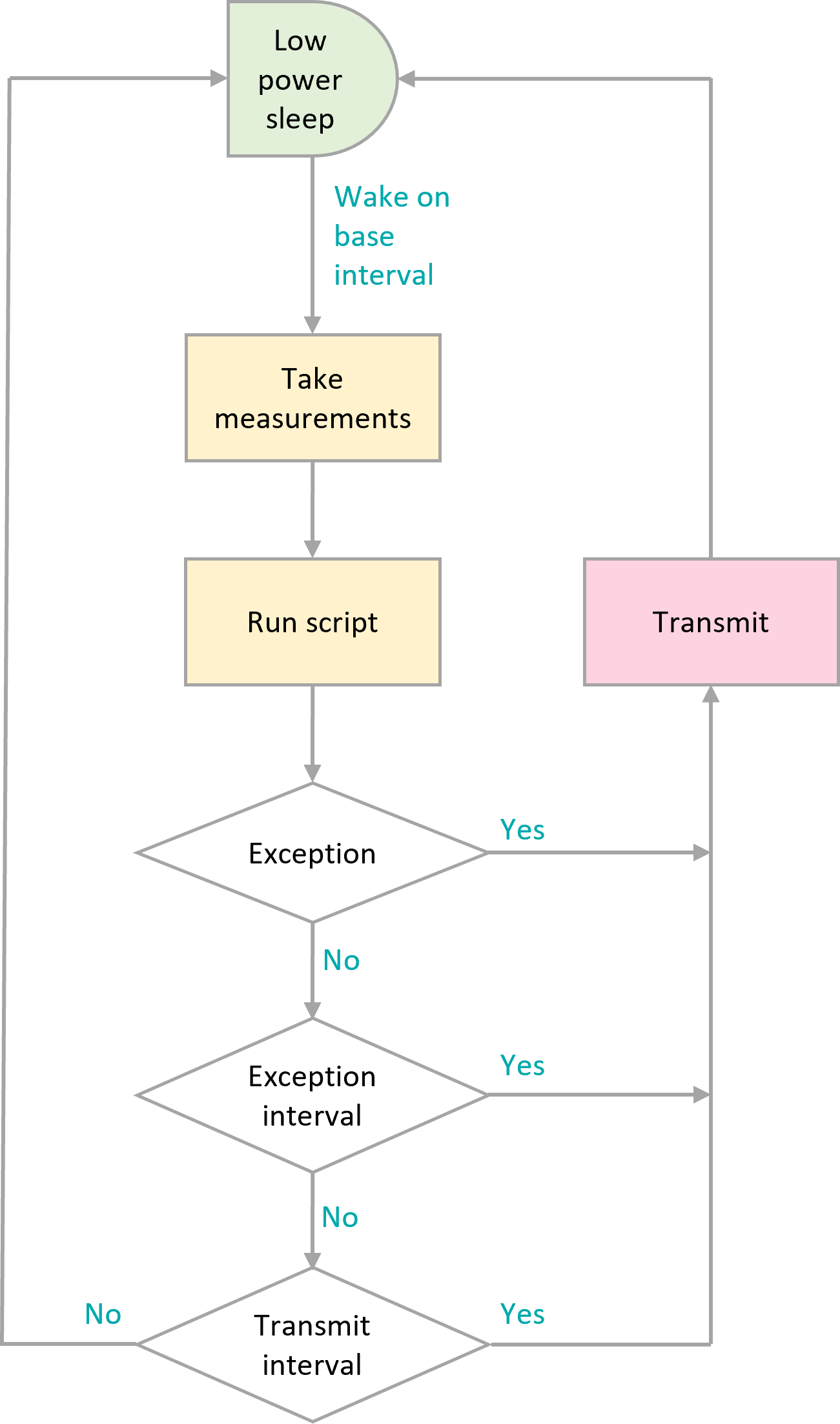
Timing flowchart
Green: Lowest power state; aim to configure the UNI-Z1 to spend maximum time in this state.
Orange: Moderate power usage; try to reduce the number of times that the UNI-Z1 wakes to measure sensors.
Pink: Highest power consumption; only transmit data when required.
A summary of wake sources and their behaviour in sleep and hibernate is given in the table below.
TODO
Table
To allow flexible measurement and transmit intervals, whilst ensuring the lowest possible power consumption, the UNI-Z1 has three global and one per-peripheral measurement interval settings.
Base-Interval The base-interval is the period of time after which the UNI-Z1 will wake from sleep in order to check if there are any measurements to perform or if it is time to transmit the latest measured data. In a system where measurements are required often, the base-interval can be as low as 5 seconds. In systems that are slow to respond, the base interval can be as high as 24 hours. It makes sense to set the base interval as long as possible to enable the UNI-Z1 to spend as much time as possible in a low-power sleep state.
Each peripheral, whether internal to the UNI-Z1 or attached to the interface, can be set to only be measured after a number of base-intervals. If a particular peripheral has the interval setting set to 1, then it will be measured at each base-interval. If the interval is set to 0, then that particular peripheral will be turned off. Each time a measurement is taken, the results will be compared with alert, warning and alarm conditions and if an alert or exception occurs, the results will immediately be transmitted.
Note
if a base-interval of less than 10 seconds is specified when the UNI-Z1 is communicating via Wi-Fi or 120 seconds over 4G LTE, the UNI-Z1 will remain awake at all times. This setting is not suitable for battery operated installations.
Note
if the enabled measurements take longer to complete than interval at which they are scheduled, the UNI-Z1 will not return to sleep and measurements will be sent as fast as possible. This is most likely where the GPS and serial devices are enabled.
Transmit-Interval The transmit-interval is the time between message transmissions. It is a multiple of the base interval and is set as a number of base-intervals. All enabled measurements will be transmitted at the transmit-interval. For example, if the base-interval is 1 minute and the transmit-interval setting is sixty, then all the latest measurements will be transmitted every 60 minutes.
In cases where the UNI-Z1 is configured to measure more often than to transmit, measured data can be saved and transmitted in batches. It is more efficient to batch messages and transmit less regularly than to send individual measurements. Use this option where power use needs to be minimised but all measured data needs to be retrieved.
Note
if during a measurement interval, an exception occurs, the UNI-Z1 will immediately transmit the measured data and will switch to the exception interval.
Note
if measurement and transmission intervals coincide, measurements will be taken before transmission to ensure the latest values are transmitted.
Exception-Interval If a warning or alarm occurs, the transmit-interval can be shortened in order that measurements are transmitted more often. The exception-interval is a multiple of the base interval and sets the time between message transmissions when an exception is current (warning or alarm). For example, if the base-interval is 1 minute and the transmit-interval setting is sixty, under normal circumstances, measurements will be transmitted every 60 minutes. If the exception-interval setting is 5, then when a warning or alarm condition is current, measurements will be transmitted at 5 minute intervals instead of 60 minute intervals.
Note
Only exceptions, which are warnings and alarms will trigger the exception-interval; alert conditions such as low battery will not.
If, on any base interval, a new exception or alert is detected, an immediate transmission will be made regardless of the transmit-interval.
Power Supply Settings
The UNI-Z1 continuously monitors its external power source and can be configured to generate alerts, enter hibernate when power is lost, and record operating hours.
Power Loss Alert
When enabled, a power loss alert is generated when the external supply voltage falls below approximately 9.5V.
Where solar power is used, temporary power loss may occur during periods of low sunlight or poor weather conditions. In these applications, power loss alerts may occur when the sun sets or heavy cloud cover reduces solar output.
Disconnect Power During Sleep
When enabled and the internal battery is charged, the UNI-Z1 disconnects its external power input during sleep and hibernate and operates from the internal battery. This reduces current drawn from the external supply by eliminating the quiescent current of the primary DC-DC converter during these periods.
The external source is automatically reconnected when battery charging is required.
Note
This setting is not recommended for solar-powered installations.
Hibernate on Power Loss
To conserve energy, the UNI-Z1 can be configured to enter hibernate mode when external power is removed.
When Hibernate on Power Loss is enabled, the device continues operating for a configurable number of base intervals after power is lost. This delay is specified by the Hibernate Delay Intervals setting.
Once the delay has expired, the device enters hibernate mode to minimise power consumption.
Hibernate Interval
The Hibernate Interval setting specifies how often the UNI-Z1 performs a full wake-up cycle while hibernating. During a full wake-up cycle, measurements are taken, alarms are processed, scripts run, and the device transmits.
The interval is configurable between 5 minutes and 24 hours and defaults to 21600 seconds (6 hours).
When hibernating, the UNI-Z1 periodically performs brief wake-ups to check for the return of external power. These wake-ups are optimised for low power consumption and do not perform a normal measurement and transmission cycle.
Count Hours
When enabled, the UNI-Z1 records the number of hours for which external power is present.
This feature can be used as a simple indication of engine or equipment operating hours where a dedicated hour meter is unavailable. More sophisticated utilisation calculations can be implemented using scripts that combine power, vibration, movement, and other measurements.
Settings
A full list of general settings is given in the table below.
TODO
Table